
We wouldn’t say changing the volume on most Android phones is tricky, but it can be a several step process if you want to change the noise level of just a specific type of sound, say alarms, or music – especially if you’re not currently using a relevant app.
Volume Notification makes the task a little bit easier, by placing volume controls on the notification dropdown, and optionally also on the lock screen. Rather than being a global control you can pick which things you want to be able to control the volume of, and add an icon for any or all of them.
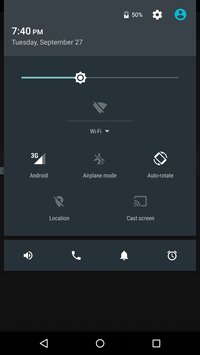
Then just tap the icon and you can adjust just the volume for that thing, be it media playback, voice calls, notifications, phone ringer, system sounds or alarms.
Volume Notification is a simple app and may not be one you use much, but if you do tend to tweak the volumes or mute specific sounds on a regular basis (or just need to be sure something isn’t going to blare out in a quiet environment) it makes doing so that much more convenient.

 Why Surf Swim
Leave a reply to Random Repeat Cancel reply