why surf the web ? swim it !!!


I’m a NOKIA phone user( personally i use asha 501),

I was stunned by using SCREENSHOT in my NOKIA phone,but unfortunately only on WHATSAPP

I have proof image of my PERSONAL WHATSAPP, take a look
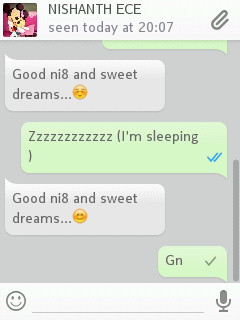
screenshot-1

Step 1: Touch and hold the ATTACHMENT icon, still you recognize a FLASH(for a moment only) in screen

Step 2: Now, press the BACK button approximately 4 times, till you get outside of WHATSAPP

Step 3: Now, go to gallery and see the SCREEN SHOT for yourself

NOTE:

GREAT THINGS HAPPEN ACCIDENTLY, THIS IS AN ACCIDENT TO ME

4 responses

  1. Dhanashri Avatar
    Dhanashri

    Its not working for me…

    Like

  2. Anil kamath Avatar
    Anil kamath

    I am currently using Asha 501 ans i dont knw to take screen shot fr what’s app… My what’s app version is 2.20.82…. Plz help me… Here

    Like

    1. PBKN Avatar

      Well now i use android phone, but reckoning my experience with asha 501, the above steps will allow you to take screenshots

      Like

Leave a reply to Anil kamath Cancel reply

This site uses Akismet to reduce spam. Learn how your comment data is processed.

Discover more from Why Surf Swim

Subscribe now to keep reading and get access to the full archive.

Continue reading