
- Theory
- Step 1: Enable Field Indexes in Your Log Group
- Step 2: Select Fields to Index
- Step 3: Verify and Save
- Step 4: Verify with CloudWatch Logs Insights (Custom Field)
- Step 5: Verify with CloudWatch Logs Insights (Existing Field)
- Cost Comparison: Real-World Savings
- Conclusion
Theory
We’ve talked about the theory behind CloudWatch Logs Field Indexes in our previous AWS Community post.
https://community.aws/content/2tV85zPTuQfGckTcPZpJR0oTe5G
Now, let’s dive into a practical, hands-on walkthrough of how to enable and use them to dramatically improve your log search performance.
Field Indexes allow you to search your logs by specific fields (columns) much more efficiently, reducing the amount of data scanned and saving you time and money. Official AWS doc – Create field indexes to improve query performance and reduce scan volume
This post will guide you through the process, step by step.
Step 1: Enable Field Indexes in Your Log Group
First, navigate to your CloudWatch console and select “Logs.” Choose the log group you want to optimize. Under the “Configuration” tab, you’ll find the “Field indexing” section. Click “Edit.”
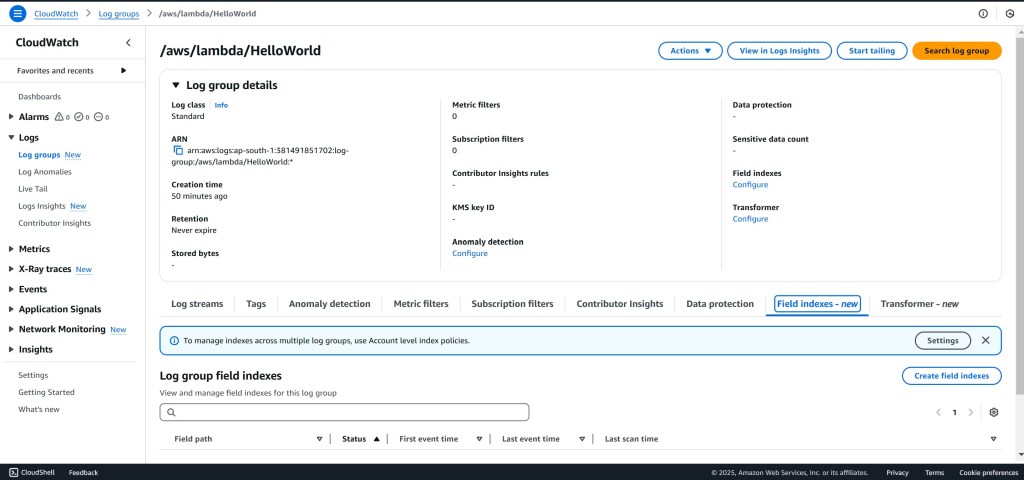
Step 2: Select Fields to Index
A dropdown menu will appear, listing the fields present in your logs. Choose the fields you frequently use for filtering or searching. These are the fields you want to optimize for faster queries.

Step 3: Verify and Save
Review your selected fields and click “Save.” It’s crucial to remember that Field Indexes only apply to logs generated after you enable indexing. Existing logs won’t benefit from this feature.

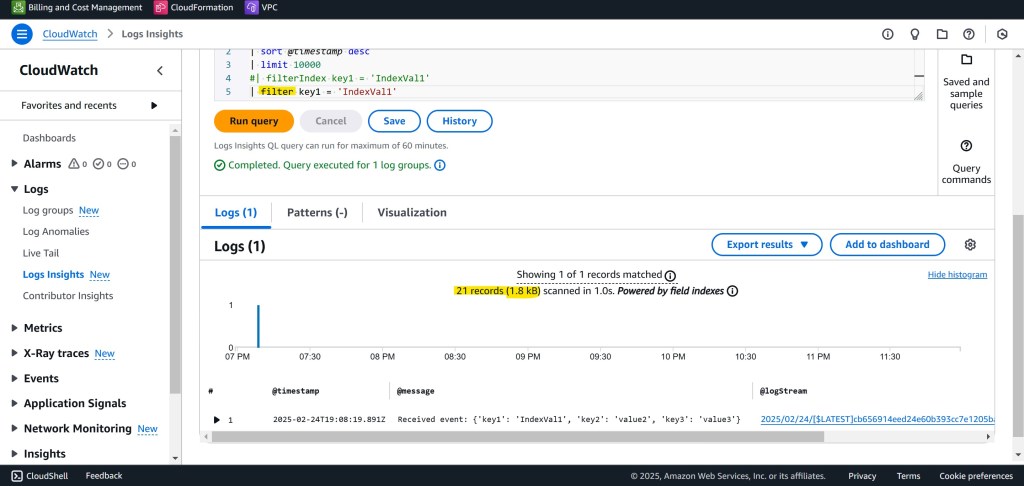
Step 4: Verify with CloudWatch Logs Insights (Custom Field)
Now, let’s see the magic in action. Head over to CloudWatch Logs Insights and run a query using a custom field (like “key1” in our example). Compare the query performance with and without Field Indexing enabled. You should see a significant improvement in the query execution time and the amount of data scanned when using the index.
CloudWatch Logs Insights – Query with Field Index – Faster Execution

CloudWatch Logs Insights – Query without Field Index – Slower Execution
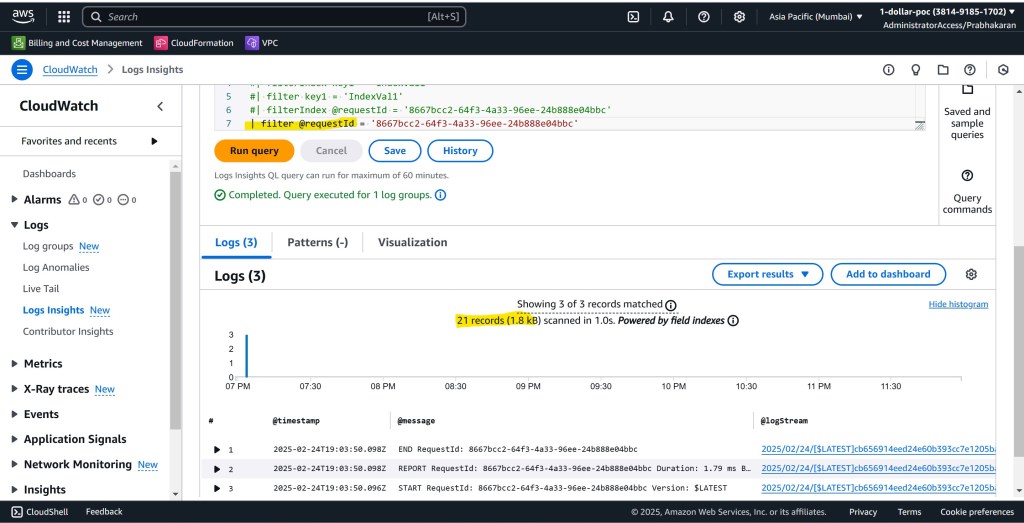
Step 5: Verify with CloudWatch Logs Insights (Existing Field)
Let’s test with a standard CloudWatch Logs field like @requestId. Again, compare the query performance with and without Field Indexing. The results will speak for themselves!
CloudWatch Logs Insights – Query with Field Index on @requestId – Faster Execution

CloudWatch Logs Insights – Query without Field Index on @requestId – Slower Execution
Cost Comparison: Real-World Savings
The benefits extend beyond just speed. Field Indexes can significantly reduce your CloudWatch Logs costs. Let’s consider a scenario:
- Without Field Indexing: If your logs are scanned row by row, and your total data scanned for a particular query is 1000 TB, at current pricing, this could cost around $5,120.
- With Field Indexing: By optimizing your log filtering, the amount of data scanned can be drastically reduced. In our experience, we’ve observed reductions down to approximately 333 TB for the same query. This would bring the cost down to around $1,704.96.
This is a substantial cost saving! Of course, your actual savings will depend on your specific log volume, query patterns, and indexed fields.
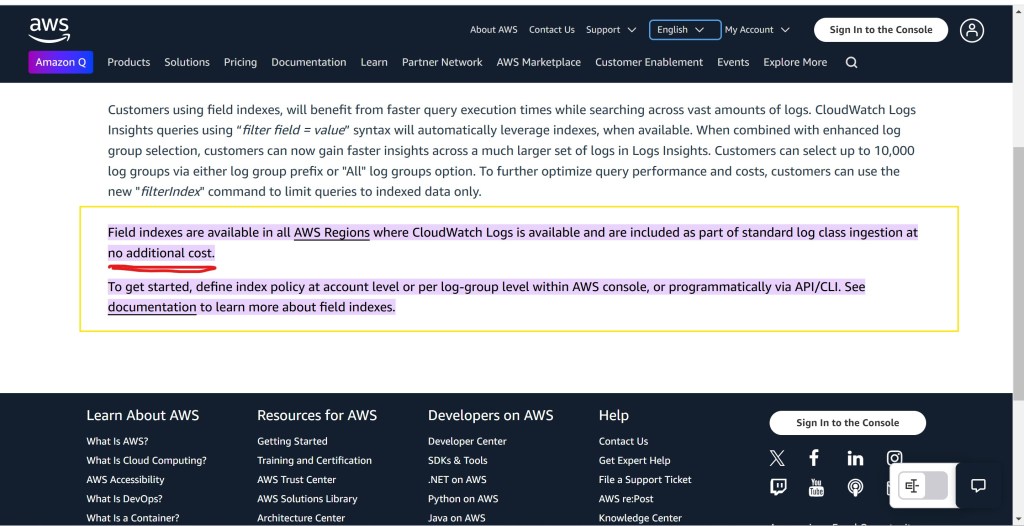
The best part is, Field Indexes are available for all standard log classes at no additional cost. The only requirement is that you enable the feature. You can do this at either the account level (affecting all new log groups) or the individual log group level, giving you granular control.
Conclusion
CloudWatch Logs Field Indexes are a powerful tool for optimizing your log search performance and reducing costs. By following these simple steps, you can unlock the full potential of your logs and gain valuable insights faster than ever before. Start indexing your frequently used fields today and experience the difference!
 Why Surf Swim
Leave a comment