
1. Service-Level Deep Dive
By default, AWS enforces a tight security model. Trust policies are set to allow only internal (same-account) principals—like AWS Lambda functions—to assume specific roles. This restriction is a built-in safeguard against the confused deputy scenario.
1.1 Architecture Diagram and Explanation
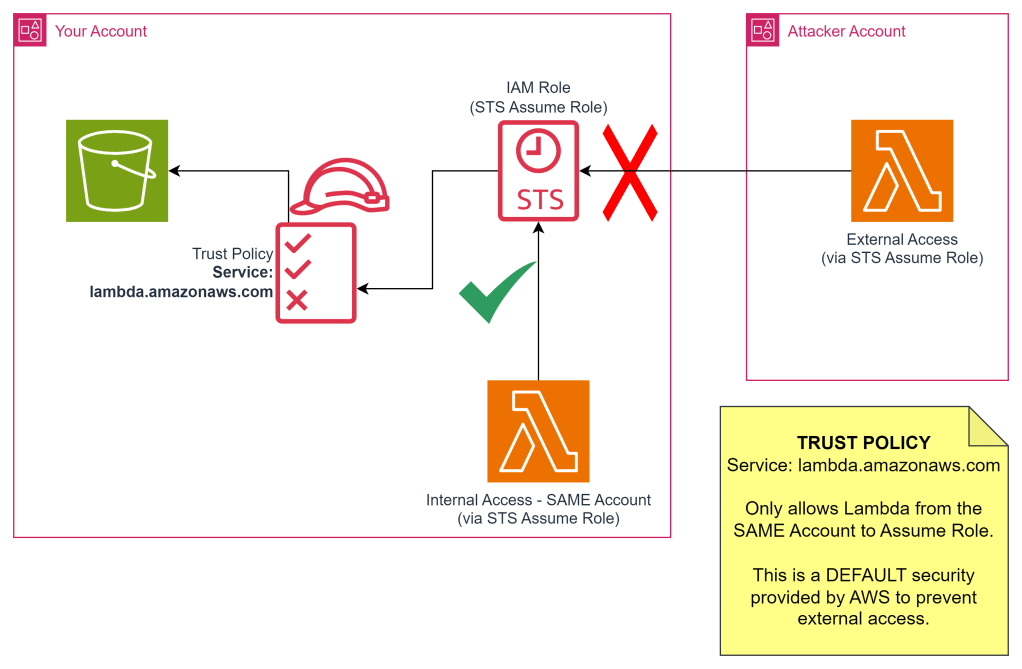
This diagram illustrates how the default configuration prevents an external account (the partner account) from assuming a role that’s meant only for internal use within the poc account.
1.2 Setup in “poc” Account
The IAM role in the “poc” account initially has the following trust policy:
{
  "Version": "2012-10-17",
  "Statement": [
    {
      "Effect": "Allow",
      "Principal": {
        "Service": "lambda.amazonaws.com"
      },
      "Action": "sts:AssumeRole"
    }
  ]
}
This policy explicitly allows the lambda.amazonaws.com service within the “poc” account to assume this role. Crucially, it does not allow services from other accounts to assume this role.
1.3 Setup in “partner” Account
The Lambda function in the “partner” account attempts to assume the role in the “poc” account:
import boto3

def lambda_handler(event, context):
    s3 = boto3.client('s3')

    list_buckets_from_assumed_role_without_mfa(
        assume_role_arn="arn:aws:iam::381491851702:role/STS-Assume-S3-Read-Only-POC",
        session_name="AssumeRoleSession",
        sts_client=boto3.client("sts")
    )

def list_buckets_from_assumed_role_without_mfa(assume_role_arn, session_name, sts_client):
    """
    Assumes a role from another account and uses the temporary credentials
    to list the S3 buckets in that account.

    :param assume_role_arn: The ARN of the role to assume.
    :param session_name: The name for the STS session.
    :param sts_client: A Boto3 STS client with permission to assume the role.
    """
    response = sts_client.assume_role(
        RoleArn=assume_role_arn,
        RoleSessionName=session_name,
    )
    temp_credentials = response["Credentials"]
    print(f"Assumed role {assume_role_arn} and got temporary credentials.")

    s3_resource = boto3.resource(
        "s3",
        aws_access_key_id=temp_credentials["AccessKeyId"],
        aws_secret_access_key=temp_credentials["SecretAccessKey"],
        aws_session_token=temp_credentials["SessionToken"],
    )

    print("Listing buckets for the assumed role's account:")
    for bucket in s3_resource.buckets.all():
        print(bucket.name)
1.4 Triggering Lambda in “partner” Account
When the Lambda function in the “partner” account is triggered, the sts:AssumeRole call fails with an AccessDenied error. This is expected and desirable. The error message clearly indicates the problem:
[ERROR] ClientError: An error occurred (AccessDenied) when calling the AssumeRole operation:
User: arn:aws:sts::307946673750:assumed-role/STS-Assume-Role-based-Service-Lambda-Role/STS-Assume-Role-based-Service-Cross-Account
is not authorized to perform: sts:AssumeRole on resource: arn:aws:iam::381491851702:role/STS-Assume-S3-Read-Only-POC
This demonstrates that AWS’s default behavior prevents cross-account role assumption, protecting the “poc” account from unauthorized access
1.5 Changing the TRUST policy in “poc” Account
To allow the “partner” account’s Lambda function to assume the role, the trust policy in the “poc” account must be explicitly updated to include the “partner” account’s principal:
{
  "Version": "2012-10-17",
  "Statement": [
    {
      "Effect": "Allow",
      "Principal": {
        "Service": "lambda.amazonaws.com",
        "AWS": "arn:aws:iam::307946673750:root" // Partner account ID
      },
      "Action": "sts:AssumeRole"
    }
  ]
}
This updated policy now explicitly trusts the “partner” account’s root user (or a specific role within the partner account) to assume the role. Only after this change will the Lambda function in the “partner” account be able to successfully assume the role and access the S3 bucket in the “poc” account.
Assumed role arn:aws:iam::381491851702:role/STS-Assume-S3-Read-Only-POC and got temporary credentials.
Listing buckets for the assumed role's account:
1.6 Demo Video
2. Role-Level Deep Dive
This part delves into the problem at the role level, showcasing how a seemingly trusted intermediary can be exploited and how to mitigate this risk using STS External IDs.

2.1 Setup in “mgmt” Account
We introduce a third account, the “mgmt” account, containing a role (STS-Assume-S3-Read-Only-MGMT) that the “poc” account needs to access. The initial trust policy in the “mgmt” account’s role allows the “poc” account to assume it:
{
  "Version": "2012-10-17",
  "Statement": [
    {
      "Effect": "Allow",
      "Principal": {
        "AWS": "arn:aws:iam::381491851702:root" // POC Account ID
      },
      "Action": "sts:AssumeRole"
    }
  ]
}
The setups in the “poc” and “partner” accounts remain the same as described in Part 1.
2.2 Code Changes in “partner” Account
The “partner” account’s Lambda function is modified to exploit the trust relationship between “poc” and “mgmt”. It first assumes the role in the “poc” account (as before) and then uses those temporary credentials to assume the role in the “mgmt” account:
import boto3

def lambda_handler(event, context):
    # Initially, assume the role from the poc account
    list_buckets_from_assumed_role_without_mfa(
        assume_role_arn="arn:aws:iam::381491851702:role/STS-Assume-S3-Read-Only-POC",
        session_name="AssumeRoleSession",
        sts_client=boto3.client("sts")
    )

def list_buckets_from_assumed_role_without_mfa(assume_role_arn, session_name, sts_client):
    """
    Assumes a role from the poc account and uses the temporary credentials to list S3 buckets.
    """
    response = sts_client.assume_role(
        RoleArn=assume_role_arn,
        RoleSessionName=session_name,
    )
    temp_credentials = response["Credentials"]
    print(f"Assumed role {assume_role_arn} and got temporary credentials.")

    s3_resource = boto3.resource(
        "s3",
        aws_access_key_id=temp_credentials["AccessKeyId"],
        aws_secret_access_key=temp_credentials["SecretAccessKey"],
        aws_session_token=temp_credentials["SessionToken"],
    )

    print("Listing buckets for the assumed role's account:")
    for bucket in s3_resource.buckets.all():
        print(bucket.name)

    # Create a new session using the assumed poc account credentials
    new_session = boto3.Session(
        aws_access_key_id=temp_credentials['AccessKeyId'],
        aws_secret_access_key=temp_credentials['SecretAccessKey'],
        aws_session_token=temp_credentials['SessionToken']
    )

    # Now, attempt to assume the mgmt account role using the new session
    list_buckets_from_confused_deputy_role(
        assume_role_arn="arn:aws:iam::401135408972:role/STS-Assume-S3-Read-Only-MGMT",
        session_name="AssumeRoleSession",
        sts_client=new_session.client('sts')
    )

def list_buckets_from_confused_deputy_role(assume_role_arn, session_name, sts_client):
    """
    Assumes a role from the mgmt account using the temporary credentials from the poc account.
    """
    response = sts_client.assume_role(
        RoleArn=assume_role_arn,
        RoleSessionName=session_name,
    )
    temp_credentials = response["Credentials"]
    print(f"Assumed role {assume_role_arn} and got temporary credentials.")

    s3_resource = boto3.resource(
        "s3",
        aws_access_key_id=temp_credentials["AccessKeyId"],
        aws_secret_access_key=temp_credentials["SecretAccessKey"],
        aws_session_token=temp_credentials["SessionToken"],
    )

    print("Listing buckets for the assumed mgmt account role:")
    for bucket in s3_resource.buckets.all():
        print(bucket.name)
This code successfully exploits the Confused Deputy problem. The “partner” account, by leveraging the “poc” account’s access, gains access to the “mgmt” account, even though it has no direct trust relationship with “mgmt”. The “partner” account effectively impersonates the “poc” account.
2.3 Prevent Confused Deputy Problem with STS External ID
To prevent this role-level exploitation, the “mgmt” account’s role trust policy is updated to include the sts:ExternalId condition:
{
  "Version": "2012-10-17",
  "Statement": [
    {
      "Effect": "Allow",
      "Principal": {
        "AWS": "arn:aws:iam::381491851702:root" // POC Account ID
      },
      "Action": "sts:AssumeRole",
      "Condition": {
        "StringEquals": {
          "sts:ExternalId": "secret-external-id-used-by-apps" // Shared secret
        }
      }
    }
  ]
}
The sts:ExternalId acts as a shared secret between the “poc” and “mgmt” accounts. The “partner” account is unaware of this value.
2.4 Access denied for “partner” to “mgmt” account
Now, even though the “partner” account can still assume the role in the “poc” account, it cannot use those credentials to assume the role in the “mgmt” account. The sts:AssumeRole call will fail with an AccessDenied error:
[ERROR] ClientError: An error occurred (AccessDenied) when calling the AssumeRole operation:
User: arn:aws:sts::381491851702:assumed-role/STS-Assume-S3-Read-Only-POC/AssumeRoleSession
is not authorized to perform: sts:AssumeRole on resource: arn:aws:iam::401135408972:role/STS-Assume-S3-Read-Only-MGMT
This demonstrates how sts:ExternalId effectively mitigates the Confused Deputy problem at the role level. By requiring a shared secret, it ensures that only authorized entities (in this case, the “poc” account, which knows the External ID) can leverage the trust relationship. The “partner” account, even with temporary credentials from the “poc” account, is blocked from accessing the “mgmt” account.
2.5 Demo Video
Conclusion
The Confused Deputy problem poses a significant security challenge in cloud environments. However, AWS provides robust mechanisms to mitigate this risk. Default service-level restrictions prevent unauthorized cross-account access by services. Furthermore, the sts:ExternalId condition provides a powerful tool to protect against role-level exploitation, ensuring that only authorized entities can leverage trust relationships. By understanding these concepts and implementing appropriate security measures, organizations can build secure and resilient AWS architectures, protecting their resources from unauthorized access and the unintended consequences of the Confused Deputy problem. Using sts:ExternalId (or similar mechanisms where appropriate) is a best practice for cross-account role access and should be a standard part of any secure AWS deployment.
https://docs.aws.amazon.com/IAM/latest/UserGuide/confused-deputy.html
 Why Surf Swim
Leave a comment