
- Video Transcription Step
- Overall Architecture & Control Flow
- Creating Knowledge Base from QuickStart
- Deploying the Code (SAM Template)
- The KnowledgeBaseSync Lambda Function
- Viewing Embeddings in Aurora Serverless
- Interacting with the Knowledge Base
- Conclusion
Video Transcription Step
Please refer to the blog post to convert video to text using AWS Transcribe
Building a Scalable Video Transcription Architecture on AWS
Learn how to automate video transcription using AWS services like S3, EventBridge, SQS, Lambda, and Amazon Transcribe. This step-by-step guide helps you create an end-to-end scalable solution for seamless video-to-text conversion, leveraging AWS best practices for efficient architecture and automation.

Overall Architecture & Control Flow

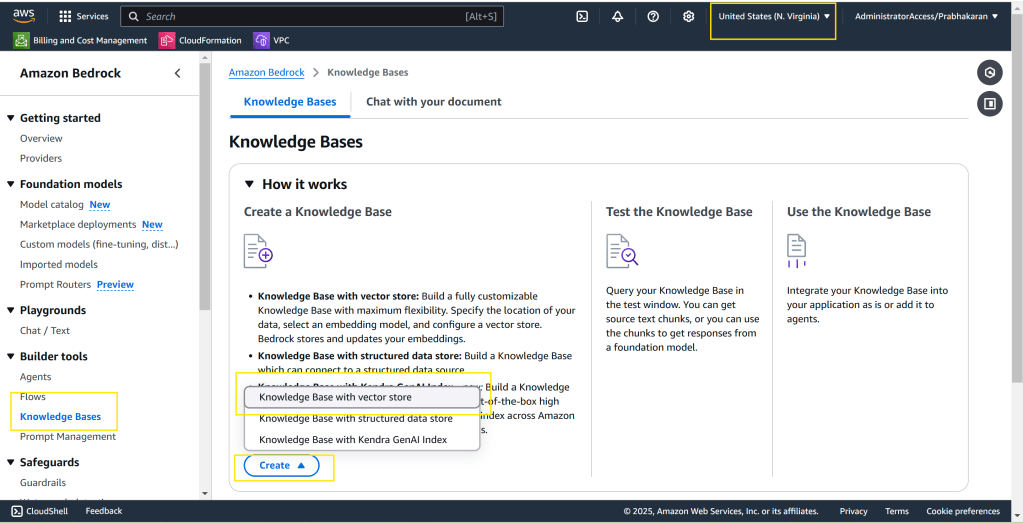
Creating Knowledge Base from QuickStart
Please select “us-east-1” region and follow the on-screen instructions or demo video posted above.
Deploying the Code (SAM Template)
Here are some critical snippets from the SAM template:
- Knowledge Base ID Parameter: We store the ID of our newly created Knowledge Base in the AWS Systems Manager (SSM) Parameter Store for easy access by other components.
YAML
  KnowledgeBaseIdParameter:
    Type: AWS::SSM::Parameter
    Properties:
      Name: /poc/bedrock/knowledgebaseid
      Type: String
      Value: "kbId" # Replace with your actual Knowledge Base ID
- SQS Queue, EventBridge Rule, and Lambda Function: These components form the core of our event-driven pipeline.
YAML
  # ... (SQS Queue, Queue Policy, EventBridge Rule definitions) ...

  KnowledgeBaseSync:
    Type: AWS::Serverless::Function
    Properties:
      # ... (Role, FunctionName, CodeUri, Handler definitions) ...
      Environment:
        Variables:
          KNOWLEDGEBASESYNC_QUEUE: !GetAtt KnowledgeBaseSyncQueue.Arn
          KNOWLEDGEBASEID_PARAMETER: !Ref KnowledgeBaseIdParameter
      Events:
        KnowledgeBaseSyncSQSEvent:
          Type: SQS
          Properties:
            Queue: !GetAtt KnowledgeBaseSyncQueue.Arn
            BatchSize: 2
            Enabled: true
            ScalingConfig:
              MaximumConcurrency: 2

  # ... (IAM Role, Log Group definitions) ...
You can get the full code base in GitHub – https://github.com/pbkn/video-bedrock-knowledgebase
The KnowledgeBaseSync Lambda Function
This Java-based Lambda function is the heart of our automation. It performs the following tasks:
- Retrieves Event Data: Extracts the S3 bucket name and object key from the SQS message.
- Fetches Knowledge Base ID: Reads the Knowledge Base ID from the SSM Parameter Store.
- Lists Data Sources: Retrieves a list of all data sources associated with the Knowledge Base.
- Starts Ingestion Job: Initiates a data ingestion job for the relevant data source using the
StartIngestionJobAPI of theBedrockAgentClient.
Here’s a snippet of the KnowledgeBaseSync function’s handleRequest method:
Java
public String handleRequest(SQSEvent input, Context context) {
    // ... (Initialization, SQS message parsing) ...

    // Extracting the knowledge base ID from the Environment Variable
    String knowledgebaseidParameter = System.getenv("KNOWLEDGEBASEID_PARAMETER");

    // ... (Error handling for missing parameter) ...

    // Extracting the knowledge base ID values from SSM Parameter store
    try (SsmClient ssmClient = SsmClient.builder()
            .region(Region.US_EAST_1)
            .credentialsProvider(DefaultCredentialsProvider.create())
            .build()) {
        knowledgeBaseIds = ssmClient.getParameter(builder -> builder
                .name(knowledgebaseidParameter)
                .withDecryption(true)
        ).parameter().value();
    } catch (Exception e) {
        // ... (Error handling for SSM retrieval) ...
    }

    String[] knowledgeBaseIdArray = knowledgeBaseIds.split(",");
    for (String kbId : knowledgeBaseIdArray) {
        kbId = kbId.trim();
        log.info("Knowledge Base ID: {}", kbId);

        // Get List of all Datasources from bedrock knowledgebase Id
        try (BedrockAgentClient bedrockAgentClient = BedrockAgentClient.builder()
                .credentialsProvider(DefaultCredentialsProvider.create())
                .region(Region.US_EAST_1)
                .build()) {
            ListDataSourcesResponse dataSourcesResponse = bedrockAgentClient.listDataSources(ListDataSourcesRequest.builder()
                    .knowledgeBaseId(kbId).build());
            for (DataSourceSummary ds : dataSourcesResponse.dataSourceSummaries()) {
                //Start data sync for updated bucket
                log.info("Data Source details: {}", ds);
                bedrockAgentClient.startIngestionJob(StartIngestionJobRequest.builder()
                        .knowledgeBaseId(kbId).dataSourceId(ds.dataSourceId())
                        .build());
            }
        } catch (Exception e) {
            // ... (Error handling for Bedrock API calls) ...
        }

    }

    return "KnowledgeBaseSync executed successfully";
}
You can get the full code base in GitHub – https://github.com/pbkn/video-bedrock-knowledgebase
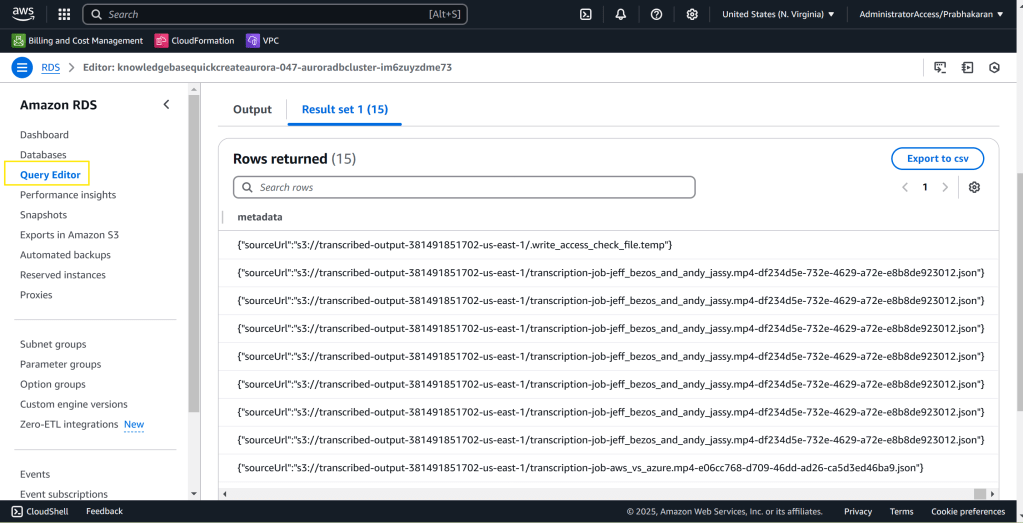
Viewing Embeddings in Aurora Serverless
Make use of AWS Query Editor to view the embedding data in Aurora Server less database. Please refer the video above for step-by-step instruction
select * from bedrock_integration.bedrock_knowledge_base;
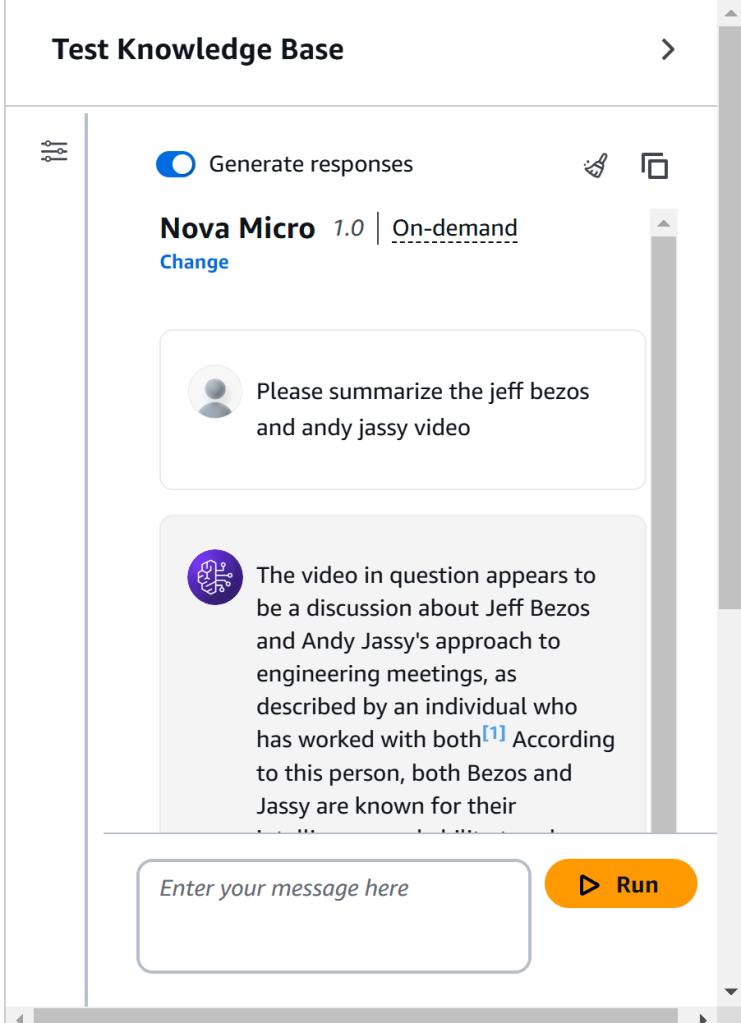
Interacting with the Knowledge Base
You now have your very own video based knowledge base
Conclusion
This POC demonstrates a powerful way to automate the ingestion of data into Amazon Bedrock Knowledge Bases. By leveraging event-driven architecture and serverless components, we can build scalable and efficient pipelines that keep our GenAI applications informed with the latest information. This approach frees developers from manual data management tasks, allowing them to focus on building innovative and impactful GenAI solutions. The same architecture can be used to ingest data into other vector stores like OpenSearch, RDS for Postgres with pgVector etc.
Next Steps:
- Explore how to integrate this pipeline with your existing transcription workflow.
- Customize the
KnowledgeBaseSyncfunction to handle different data formats or perform additional data processing. - Experiment with different Bedrock models and Knowledge Base configurations to optimize your GenAI application’s performance.
By implementing this automated ingestion pipeline, you can unlock the full potential of Amazon Bedrock Knowledge Bases and build truly intelligent GenAI applications.
 Why Surf Swim
Leave a comment