
- Step 1: Creating Input and Output S3 Buckets
- Step 2: Using Amazon EventBridge for Event Management
- Step 3: Controlling Invocations with Amazon SQS
- Step 4: Using AWS SDK v2 for Java 11
- Step 5: Storing Transcription Output in the Target S3 Bucket
- Summary of the Solution
- GitHub Repository
- What’s Next?
We’ll walk through an automated solution for video transcription using AWS services. The architecture includes creating S3 buckets for input and output, leveraging Amazon EventBridge for centralized event management, using Amazon SQS to control parallel processing, and invoking Amazon Transcribe via a Lambda function. Let’s explore how we achieve this end-to-end solution, all while following best practices for scalability and reliability.
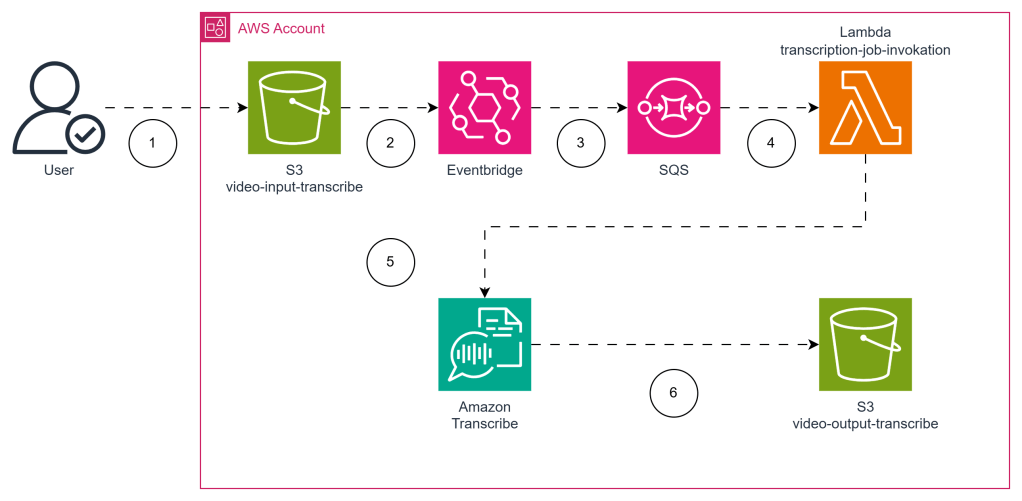
Step 1: Creating Input and Output S3 Buckets
The first step is to set up our S3 buckets for video input and output. These buckets act as the core storage locations for our videos that need transcription. Using a Serverless Application Model (SAM) template, we define the input (video-input-transcribe) and output (video-output-transcribe) buckets with a DeletionPolicy to ensure they are not accidentally deleted during stack deletions.
Here’s an example snippet of the SAM template used to create these buckets:
Resources:
  VideoInputBucket:
    Type: AWS::S3::Bucket
    Properties:
      BucketName: video-input-transcribe
    DeletionPolicy: Retain

  VideoOutputBucket:
    Type: AWS::S3::Bucket
    Properties:
      BucketName: video-output-transcribe
    DeletionPolicy: Retain
Adding DeletionPolicy: Retain makes sure that our data stays safe, even if our CloudFormation stack is deleted. This is particularly important when dealing with valuable or irreplaceable video content.
Step 2: Using Amazon EventBridge for Event Management
Instead of relying on the traditional S3 Event Notifications to trigger downstream actions, we use Amazon EventBridge. EventBridge offers a powerful and centralized way to handle events across different AWS services.
By using EventBridge, we have a central place to define our event rules and direct events as needed. In our architecture, whenever a video is uploaded to the video-input-transcribe bucket, an EventBridge rule is triggered, and an event is sent to an SQS queue.
Here’s a sample SAM configuration to create the EventBridge rule:
VideoUploadEventRule:
  Type: AWS::Events::Rule
  Properties:
    EventPattern:
      source:
        - "aws.s3"
      detail-type:
        - "Object Created"
      resources:
        - !GetAtt VideoInputBucket.Arn
    Targets:
      - Arn: !GetAtt VideoUploadQueue.Arn
        Id: "VideoUploadTarget"
EventBridge allows for more flexibility and manageability compared to directly using S3 event notifications, making it a great choice for larger, event-driven architectures.
Step 3: Controlling Invocations with Amazon SQS
To control the number of parallel executions of our AWS Lambda function, we use Amazon SQS. By placing events in an SQS queue and configuring our Lambda function to process messages from the queue, we can effectively limit the number of concurrent Lambda invocations.
We use TranscriptionSQSEvent to manage the queue, which ensures that the SQS queue acts as a buffer for Lambda invocations, controlling concurrency efficiently.
TranscriptionJobQueue:
  Type: AWS::SQS::Queue
  Properties:
    QueueName: video-transcription-queue

TranscriptionJobLambda:
  Type: AWS::Serverless::Function
  Properties:
    Handler: com.whysurfswim.TranscriptionJobInvocation::handleRequest
    Runtime: java11

      Events:
        TranscriptionSQSEvent:
          Type: SQS
          Properties:
            Queue: !GetAtt TranscriptionQueue.Arn
            BatchSize: 1
            Enabled: true
            ScalingConfig:
              MaximumConcurrency: 2
The configuration ensures that each video is processed one-by-one by using SQS to sequentially pass messages to Lambda, reducing the risk of overwhelming downstream components and helping maintain efficient resource use.
Step 4: Using AWS SDK v2 for Java 11
In our Lambda function, we leverage AWS SDK v2 with Java 11 to interact with Amazon Transcribe. The use of AWS SDK v2 is highly recommended as it offers numerous improvements, including non-blocking I/O and better performance compared to SDK v1.
Below is an example code snippet from the GitHub Repository showing how we set up the Transcribe Client and initiate an asynchronous transcription job:
import software.amazon.awssdk.services.transcribe.TranscribeClient;
import software.amazon.awssdk.services.transcribe.model.StartTranscriptionJobRequest;
import software.amazon.awssdk.services.transcribe.model.Media;

TranscribeClient transcribeClient = TranscribeClient.create();
String transcriptionJobName = "transcription-job-" + UUID.randomUUID();

StartTranscriptionJobRequest transcriptionJobRequest = StartTranscriptionJobRequest.builder()
        .transcriptionJobName(transcriptionJobName)
        .languageCode("en-US")
        .media(Media.builder().mediaFileUri("s3://video-input-transcribe/example.mp4").build())
        .mediaFormat("mp4")
        .outputBucketName("video-output-transcribe")
        .build();

transcribeClient.startTranscriptionJob(transcriptionJobRequest);
By using Java 11 and the AWS SDK v2, we ensure our Lambda code benefits from the latest improvements in both performance and maintainability, making our solution future-proof.
Step 5: Storing Transcription Output in the Target S3 Bucket
Finally, the transcription output is stored in the video-output-transcribe S3 bucket. The configuration for the Transcribe Job Request directs the transcription output to this specific bucket, where it can be accessed or further processed as needed.
With the AWS SDK v2, it’s easy to specify the output location directly in the request, which means there is no need for any post-processing steps to move the transcribed text to the output bucket.
.outputBucketName("video-output-transcribe")
This simple yet effective solution ensures that every video uploaded is automatically transcribed and stored in a safe location, ready for further processing or analysis.
Summary of the Solution
By using a combination of S3, Amazon EventBridge, Amazon SQS, AWS Lambda, and Amazon Transcribe, we have built a streamlined architecture for automatic video transcription. The use of SAM for infrastructure as code, along with thoughtful considerations for scalability and event management, makes this solution easy to deploy, manage, and scale.
With the architecture divided into logical parts, such as input and output S3 buckets, centralized EventBridge management, and SQS for controlling Lambda concurrency, this approach is well suited for robust automation scenarios.
GitHub Repository
To explore the full implementation, visit the GitHub Repository. The repository contains the complete SAM template, Java code, and deployment instructions to help you get started quickly.
What’s Next?
In the next phase, we will explore how to integrate AWS Bedrock for advanced summarization, enhancing our transcription solution to generate quick, actionable summaries for each video. Stay tuned, and follow for more updates as we refine this architecture and introduce new, innovative capabilities!
 Why Surf Swim
Leave a comment