
- Introduction
- The Initial Challenge
- First Attempts and Obstacles
- Understanding AWS Conformance Pack Limitations
- Unraveling IAM Role Configurations
- Simplifying the Solution
- The Final Working Template
- Key Learnings and Takeaways
- Conclusion
- Screenshots
Introduction
AWS Config Conformance Packs provide a way to deploy a collection of Config rules and remediation actions as a single entity across an AWS Organization or individual accounts. While powerful, deploying Conformance Packs with custom remediation actions can be challenging due to the intricate interplay between different AWS services and resource configurations.
In this post, we’ll walk through the journey of overcoming deployment failures and remediation execution issues, highlighting the troubleshooting steps and final solution that led to a successful implementation.
The Initial Challenge
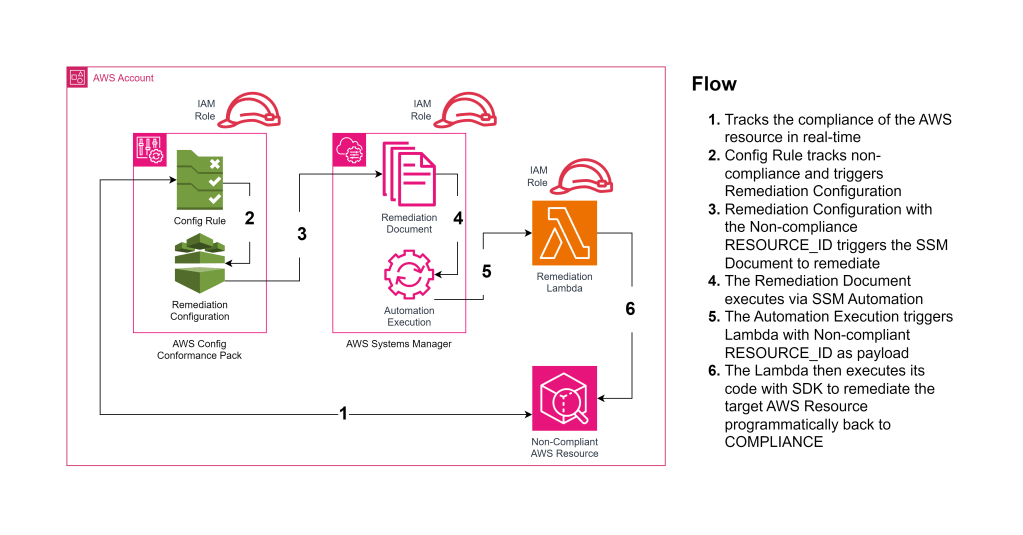
Our goal was to deploy a Conformance Pack that enforces the s3-bucket-level-public-access-prohibited Config rule and automatically remediates non-compliant S3 buckets by invoking a custom AWS Lambda function. The architecture involves:
- AWS Config: To evaluate S3 buckets against the compliance rule.
- AWS Lambda: A custom function to remediate non-compliant buckets.
- AWS Systems Manager Automation Document: To orchestrate the remediation action.
- IAM Roles: To grant necessary permissions to AWS services.
Despite setting up the templates and configurations, we encountered deployment failures and remediation actions that did not execute as expected.
First Attempts and Obstacles
Deployment Failures
The initial deployment attempts resulted in errors like:
CREATE_FAILED AWS::Config::ConformancePack S3ConformancePack Resource handler returned message: "Invalid request provided: Invalid conformance pack template provided. Errors found: [Invalid role ARN provided for auto remediation configuration]. Fix your template and try again."Challenges Faced:
- Parameter Substitution Issues: Placeholders and intrinsic functions in the Conformance Pack template were not being substituted correctly.
- Unsupported Intrinsic Functions: Using
!Refand!Subwithin the Conformance Pack template, which are not supported.
Remediation Execution Failures
Even after hardcoding values and successfully deploying the Conformance Pack, the remediation actions failed silently, providing minimal information to debug the issue.
Understanding AWS Conformance Pack Limitations
Through trial and error, we discovered key limitations:
- Intrinsic Functions Not Supported: Conformance Pack templates do not support CloudFormation intrinsic functions like
!Ref,!Sub,!GetAtt, etc. - Placeholder Syntax: Parameters should be referenced using
${ParameterName}within the template.
Key Realizations:
- Use of Parameters: Correctly defining and referencing parameters is crucial.
- Direct Inclusion of Resources: Embedding the Conformance Pack directly within the SAM template simplifies parameter passing and substitution.
Unraveling IAM Role Configurations
IAM roles play a pivotal role in granting permissions to AWS services. Misconfigurations can lead to cryptic errors and failed executions.
Actions Taken:
- Simplified IAM Roles: Removed unnecessary roles and combined permissions where appropriate.
- Corrected Trust Relationships: Ensured that roles had correct
AssumeRolePolicyDocumentconfigurations. - Verified Permissions: Granted necessary actions to roles, following the principle of least privilege.
Simplifying the Solution
Realizing the complexities introduced by external templates and convoluted role configurations, we decided to simplify:
- Embedded Conformance Pack in SAM Template: Used the
TemplateBodyproperty to define the Conformance Pack directly. - Used
!Subfor Variable Substitution: Leveraged the!Subintrinsic function in the SAM template to substitute variables. - Parameterized SSM Document: Modified the SSM Automation Document to accept parameters for dynamic values.
The Final Working Template
Here’s the simplified and functional SAM template:
AWSTemplateFormatVersion: '2010-09-09'
Transform: AWS::Serverless-2016-10-31
Description: AWS Conformance Pack with Remediation for S3 Public Access Blocking

Parameters:
  ConfigDeliveryBucketName:
    Type: String
    Default: config-delivery-bucket
    Description: Name of the S3 bucket for AWS Config delivery channel

Resources:

  ### Lambda Function ###
  RemediationLambdaFunction:
    Type: AWS::Serverless::Function
    Properties:
      FunctionName: RemediateS3PublicAccess
      Runtime: java11
      Handler: conformance.pack.LambdaHandler::handleRequest
      CodeUri: Remediation
      MemorySize: 512
      Timeout: 60
      Role: !GetAtt LambdaExecutionRole.Arn

  ### Lambda Execution Role ###
  LambdaExecutionRole:
    Type: AWS::IAM::Role
    Properties:
      RoleName: LambdaExecutionRole
      ManagedPolicyArns:
        - arn:aws:iam::aws:policy/service-role/AWSLambdaBasicExecutionRole
        - arn:aws:iam::aws:policy/AmazonS3FullAccess
      AssumeRolePolicyDocument:
        Version: '2012-10-17'
        Statement:
          - Effect: Allow
            Principal:
              Service: lambda.amazonaws.com
            Action: sts:AssumeRole

  ### SSM Automation Document ###
  RemediationSSMDocument:
    Type: AWS::SSM::Document
    Properties:
      DocumentType: Automation
      DocumentFormat: YAML
      Name: Remediate-S3-Public-Access
      Content:
        schemaVersion: '0.3'
        description: Remediation document to block public access on S3 buckets
        assumeRole: "{{AutomationAssumeRole}}"
        parameters:
          BucketName:
            type: String
            description: 'Name of the non-compliant S3 bucket'
          AutomationAssumeRole:
            type: AWS::IAM::Role::Arn
            description: 'Remediation role to invoke lambda'
        mainSteps:
          - name: RemediateS3Bucket
            action: 'aws:invokeLambdaFunction'
            onFailure: Abort
            inputs:
              FunctionName: !Ref RemediationLambdaFunction
              Payload: '{"BucketName": "{{BucketName}}"}'

  ### Config Remediation Role ###
  ConfigRemediationRole:
    Type: AWS::IAM::Role
    Properties:
      RoleName: ConfigRemediationRole
      AssumeRolePolicyDocument:
        Version: '2012-10-17'
        Statement:
          - Effect: Allow
            Principal:
              Service:
                - config.amazonaws.com
                - ssm.amazonaws.com
            Action: sts:AssumeRole
      Policies:
        - PolicyName: ConfigRemediationPolicy
          PolicyDocument:
            Version: '2012-10-17'
            Statement:
              - Effect: Allow
                Action:
                  - 'ssm:StartAutomationExecution'
                  - 'iam:PassRole'
                Resource:
                  - !Sub "arn:aws:ssm:${AWS::Region}:${AWS::AccountId}:document/${RemediationSSMDocument}"
              - Effect: Allow
                Action:
                  - lambda:InvokeFunction
                Resource: !GetAtt RemediationLambdaFunction.Arn

  ### Conformance Pack ###
  S3ConformancePack:
    Type: AWS::Config::ConformancePack
    Properties:
      ConformancePackName: S3PublicAccessConformancePack
      TemplateBody: !Sub |
        ---
        Resources:
          S3BucketPublicAccessProhibitedRule:
            Type: AWS::Config::ConfigRule
            Properties:
              ConfigRuleName: s3-bucket-level-public-access-prohibited
              Source:
                Owner: AWS
                SourceIdentifier: S3_BUCKET_LEVEL_PUBLIC_ACCESS_PROHIBITED
          S3BucketPublicAccessRemediation:
            Type: "AWS::Config::RemediationConfiguration"
            Properties:
              ConfigRuleName: s3-bucket-level-public-access-prohibited
              TargetType: "SSM_DOCUMENT"
              TargetId: ${RemediationSSMDocument}
              Parameters:
                AutomationAssumeRole:
                  StaticValue:
                    Values:
                      - ${ConfigRemediationRole.Arn}
                BucketName:
                  ResourceValue:
                    Value: "RESOURCE_ID"
              Automatic: True
              MaximumAutomaticAttempts: 5
              RetryAttemptSeconds: 60

Outputs:
  ConformancePackName:
    Description: Name of the conformance pack
    Value: !Ref S3ConformancePack
Full code-base with Lambda module available in GitHub here – https://github.com/pbkn/conformance-pack-template
Key Learnings and Takeaways
- Understand Service Limitations: Knowing the constraints of AWS services (e.g., Conformance Packs not supporting intrinsic functions) is crucial.
- Simplify Where Possible: Embedding resources directly and removing unnecessary components can reduce complexity and potential errors.
- Correct IAM Role Configurations: Proper trust relationships and permissions are essential for AWS services to interact correctly.
- Effective Use of Intrinsic Functions: Using
!Subfor variable substitution within the same template ensures accurate and immediate value resolution. - Thorough Testing: Testing components individually and as part of the integrated solution helps identify and resolve issues efficiently.
Conclusion
Deploying AWS Config Conformance Packs with custom remediation actions can be challenging, but with persistence and a methodical approach, it’s possible to overcome obstacles and achieve a successful implementation. By understanding service limitations, simplifying configurations, and ensuring correct IAM role setups, we arrived at a solution that works seamlessly.
Screenshots
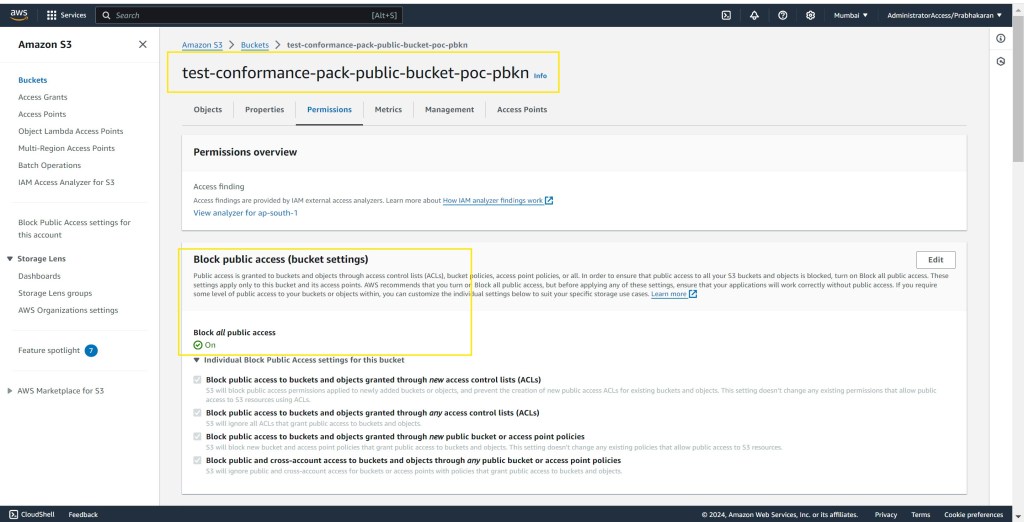
To see the solution in action and for a step-by-step walkthrough, check out the video & screenshots below:


Thank you for joining us on this journey from frustration to success. We hope this blog post helps you navigate similar challenges and enhances your understanding of AWS Config Conformance Packs and remediation actions.
 Why Surf Swim
Leave a comment