
In the world of serverless computing, AWS Lambda stands out for its ease of use and efficiency in running code in response to triggers. However, the simplicity on the surface belies the complexity beneath, especially when it comes to permissions and logging. Recently, I implemented an AWS-guided project that required DynamoDB Cross Account Replication using Lambda.
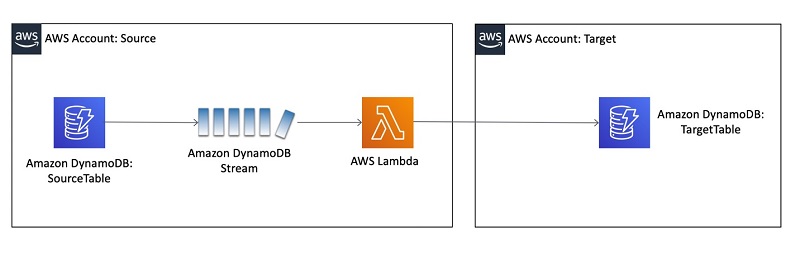
This journey led me through a maze of IAM roles, policy assignments, and log group retentions, culminating in valuable lessons learned.
The Initial Hurdle
It seemed straightforward at first: deploy a Lambda function using AWS SAM (Serverless Application Model). However, the simplicity was deceptive. Upon deployment by adding the Roles & Policies in the template, I was greeted with an error stating, “The role defined for the function cannot be assumed by Lambda.” This message was my first sign that the road ahead would be bumpy.
Unraveling the Mistake
The root of my troubles lay in the template.yaml configuration. I had meticulously crafted an IAM role for my Lambda function but mistakenly assigned the role ARN incorrectly. Additionally, I had included a RolePath property in my Lambda function’s definition—a property that, to my later realization, does not exist in AWS SAM’s schema for Lambda functions. These missteps were the culprits behind the failure.
The Solution Unfolded
Correcting my mistakes involved two key actions. Firstly, I ensured the Lambda function correctly referenced the IAM role’s ARN. This adjustment was crucial for allowing the Lambda service to assume the role as intended. Here’s how I corrected the role reference:
IAM Role Creation
Resources:
  DDBCARLambdaRole:
    Type: AWS::IAM::Role
    Properties:
      RoleName: "DDB-CAR-Lambda-Role"
      Path: "/"
      ManagedPolicyArns:
        - arn:aws:iam::aws:policy/service-role/AWSLambdaBasicExecutionRole
        - arn:aws:iam::aws:policy/service-role/AWSLambdaDynamoDBExecutionRole
      AssumeRolePolicyDocument:
        Version: "2012-10-17"
        Statement:
          - Effect: "Allow"
            Principal:
              Service:
                - "lambda.amazonaws.com"
            Action:
              - "sts:AssumeRole"
      Policies:
        - PolicyName: "DDB-CAR-Policy"
          PolicyDocument:
            Version: "2012-10-17"
            Statement:
              - Effect: "Allow"
                Action:
                  - "sts:GetSessionToken"
                  - "sts:DecodeAuthorizationMessage"
                  - "sts:GetAccessKeyInfo"
                  - "sts:GetCallerIdentity"
                  - "sts:GetServiceBearerToken"
                Resource: "*"
Linking the Role with Lambda
DDBCARFunction:
    Type: AWS::Serverless::Function
    Properties:
      CodeUri: LambdaFunction
      FunctionName: "DDB-CAR-Lambda-Function-POC"
      Role: !GetAtt DDBCARLambdaRole.Arn
      #More relevant properties
Secondly, I removed the non-existent RolePath property, streamlining my configuration to align with AWS SAM’s expectations. These changes proved to be the remedy my deployment needed.
Enhancing Log Retention
With the role issue resolved, my attention turned to log management. Initially, my setup lacked a defined log retention policy, risking uncontrolled log accumulation. To address this, I introduced a LogGroup resource with a RetentionInDays property in my template.yaml, specifying how long logs should be retained:
  LogGroup:
    Type: AWS::Logs::LogGroup
    Properties:
      LogGroupName: !Sub '/aws/lambda/${DDBCARFunction}' #linking lambda function
      RetentionInDays: 30
This addition ensured that logs older than the specified period were automatically purged, keeping the log management neat and cost-effective.
Reflecting on the Journey
This venture into AWS Lambda’s world underscored the importance of precision in IAM role and policy configurations, as well as the practicality of log retention strategies. Each error, while a temporary setback, served as a stepping stone towards a deeper understanding of AWS’s serverless ecosystem.
In sharing this journey, I aim to illuminate the path for others navigating similar challenges. The key takeaway? Attention to detail is paramount. Whether you’re configuring IAM roles or managing logs, every line of code holds significance. May your serverless deployments be seamless, and your learning curve steep but rewarding.
 Why Surf Swim
Leave a comment