
A Hands-On Guide with Java 8, AWS SAM and AWS SDK v2
Tired of data silos? Imagine your DynamoDB tables seamlessly syncing across accounts, unlocking powerful use cases like disaster recovery, global deployments, and real-time analytics. Stop dreaming, start building!
Reference from Original Architecture posted on Jan/2021 in AWS Blogpost:
https://aws.amazon.com/blogs/database/cross-account-replication-with-amazon-dynamodb/

This guide dives deep into creating a cross-account replication system using the powerful combo of AWS SAM v2 and Java 8. Buckle up, developers, and get ready to revolutionize your data management!
Prerequisites:
- IntelliJ IDEA: Your trusted coding companion.
- Docker Desktop: Let’s get containerized!
- AWS SAM CLI: Manage your serverless apps like a pro.
- AWS Account & DynamoDB Table (Source): Your data kingdom with Keys
Id(Number)andUpdatedDate(String). - AWS Member Account & DynamoDB Table (Target): The new home for your replicated data with Keys
Id(Number)andUpdatedDate(String). (https://docs.aws.amazon.com/organizations/latest/userguide/orgs_manage_accounts_create.html)

Step-by-Step Hero’s Journey:
Tools Time:
Install Docker Desktop and keep it running in the background

Install AWS Toolkit for IntelliJ IDEA: refer https://aws.amazon.com/blogs/developer/aws-toolkit-for-intellij-now-generally-available/
Clone the project repo from https://github.com/pbkn/DDB-CAR
IAM Magic:
In your Source Account, create the IAM role and trust policy below.
Keep note of the Role ARN:
Source IAM Role: Policies
– AWSLambdaBasicExecutionRole
– AWSLambdaDynamoDBExecutionRole
– DDB-CAR-TrustPolicy (Code below)
{
    "Version": "2012-10-17",
    "Statement": [
        {
            "Sid": "VisualEditor0",
            "Effect": "Allow",
            "Action": [
                "sts:GetSessionToken",
                "sts:DecodeAuthorizationMessage",
                "sts:GetAccessKeyInfo",
                "sts:GetCallerIdentity",
                "sts:GetServiceBearerToken"
            ],
            "Resource": "*"
        },
        {
            "Sid": "VisualEditor1",
            "Effect": "Allow",
            "Action": "sts:*",
            "Resource": "arn:aws:iam::{Target-Account-Number}:role/DDB-CAR-Role"
        }
    ]
}
Source IAM Role: Trust Policy
{
    "Version": "2012-10-17",
    "Statement": [
        {
            "Effect": "Allow",
            "Principal": {
                "AWS": "arn:aws:iam::{Target-Account-Number}:root",
                "Service": "lambda.amazonaws.com"
            },
            "Action": "sts:AssumeRole",
            "Condition": {}
        }
    ]
}
In your Target Account, create the IAM role and trust policy below. Keep note of the Role ARN: Target IAM Role: Policies
– DDB-CAR-Policy
{
    "Version": "2012-10-17",
    "Statement": [
        {
            "Sid": "VisualEditor0",
            "Effect": "Allow",
            "Action": [
                "dynamodb:BatchGetItem",
                "dynamodb:BatchWriteItem",
                "dynamodb:PutItem",
                "dynamodb:DescribeTable",
                "dynamodb:DeleteItem",
                "dynamodb:GetItem",
                "dynamodb:Scan",
                "dynamodb:Query",
                "dynamodb:UpdateItem"
            ],
            "Resource": "arn:aws:dynamodb:ap-south-1:{Target-Account-Number}:table/Target-DDB"
        },
        {
            "Sid": "VisualEditor1",
            "Effect": "Allow",
            "Action": "dynamodb:ListTables",
            "Resource": "*"
        }
    ]
}
Target IAM Role: Trust Policy
{
    "Version": "2012-10-17",
    "Statement": [
        {
            "Effect": "Allow",
            "Principal": {
                "AWS": [
                    "arn:aws:iam::{Source-Account-Number}:root",
                    "arn:aws:iam::{Source-Account-Number}:role/DDB-CAR-Source-Role"
                ]
            },
            "Action": "sts:AssumeRole",
            "Condition": {}
        }
    ]
}
Stream On:
In your Source Account, enable Streams in your DynamoDB table and keep note of the Stream ARN.

Template Talk:
In your project, go to the template.yaml file and update the <Role> and <Stream> values with the ARNs you noted in the above steps:

SDK Spotlight:
Observe the power of AWS SDK v2 and DynamoDB enhanced client in POM.xml
 <properties>
        <maven.compiler.source>1.8</maven.compiler.source>
        <maven.compiler.target>1.8</maven.compiler.target>
        <aws.sdk.version>2.24.0</aws.sdk.version>
 </properties>

    <dependencyManagement>
        <dependencies>
            <dependency>
                <groupId>software.amazon.awssdk</groupId>
                <artifactId>bom</artifactId>
                <version>${aws.sdk.version}</version>
                <type>pom</type>
                <scope>import</scope>
            </dependency>
        </dependencies>
    </dependencyManagement>

<dependencies>
        <dependency>
            <groupId>software.amazon.awssdk</groupId>
            <artifactId>dynamodb</artifactId>
        </dependency>
        <dependency>
            <groupId>software.amazon.awssdk</groupId>
            <artifactId>dynamodb-enhanced</artifactId>
        </dependency>
        <dependency>
            <groupId>software.amazon.awssdk</groupId>
            <artifactId>sts</artifactId>
            <version>2.24.0</version>
        </dependency>
</dependencies>
Data Schema:
Understand DynamoDbBean, DynamoDbPartitionKey, and DynamoDbSortKey in TargetDDBSchema.java
@Data
@NoArgsConstructor
@AllArgsConstructor
@Builder
@DynamoDbBean
public class TargetDDBSchema {

    private Long id;
    private String updatedDate;
    private String message;
    private Boolean checkedItem;

    @DynamoDbPartitionKey
    @DynamoDbAttribute("Id")
    public Long getId() {
        return id;
    }

    @DynamoDbSortKey
    @DynamoDbAttribute("UpdatedDate")
    public String getUpdatedDate() {
        return updatedDate;
    }

    @DynamoDbAttribute("Message")
    public String getMessage() {
        return message;
    }

    @DynamoDbAttribute("CheckedItem")
    public Boolean getCheckedItem() {
        return checkedItem;
    }
}
Target & Conquer:
Modify the <TARGET_STS_ROLE_ARN> and <TARGET_DDB_TABLE> values accordingly in Constants.java
    public static final String TARGET_DDB_TABLE = "Target-DDB";

    public static final String TARGET_STS_ROLE_ARN = "arn:aws:iam::381492012287:role/DDB-CAR-Role";
Code Craft:
Observe how DynamoDbEnhancedClient, STSClient, and TargetDDBSchema are handled and coded in App.java:
    @Override
    public String handleRequest(final DynamodbEvent input, final Context context) {
        try {
            List<DynamodbEvent.DynamodbStreamRecord> records = input.getRecords();

            for (Record record : records) {
                logger.info("Received record with eventId: {}", record.getEventID());

                if (Objects.nonNull(record.getDynamodb().getKeys()) && Objects.nonNull(record.getDynamodb().getNewImage())) {
                    logger.info("Received record with keys: {}", record.getDynamodb().getKeys());
                    logger.info("Received record with newImage: {}", record.getDynamodb().getNewImage());
                    logger.info("Received record with eventName: {}", record.getEventName());
                    logger.info("Received record with sizeBytes: {}", record.getDynamodb().getSizeBytes());

                    try (StsClient stsClient = StsClient.builder().region(Region.AP_SOUTH_1).build()) {

                        AwsSessionCredentials sessionCredentials = getAwsSessionCredentials(stsClient);

                        DynamoDbClient dynamoDbClient = DynamoDbClient.builder().region(Region.AP_SOUTH_1).credentialsProvider(AwsCredentialsProviderChain.builder().credentialsProviders(StaticCredentialsProvider.create(sessionCredentials)).build()).build();
                        DynamoDbEnhancedClient dynamoDbEnhancedClient = DynamoDbEnhancedClient.builder().dynamoDbClient(dynamoDbClient).build();
                        DynamoDbTable<TargetDDBSchema> targetDDBTable = dynamoDbEnhancedClient.table(Constants.TARGET_DDB_TABLE, TableSchema.fromClass(TargetDDBSchema.class));
                        TargetDDBSchema targetDDBSchema = getTargetDDBSchema(record);
                        if (Constants.DDB_EVENT_REMOVE.equals(record.getEventName())) {
                            targetDDBTable.deleteItem(targetDDBTable.keyFrom(targetDDBSchema));
                        } else {
                            targetDDBTable.putItem(targetDDBSchema);
                        }
                        logger.info("{} item in table {} with Id: {} successfully", record.getEventName(), Constants.TARGET_DDB_TABLE, record.getDynamodb().getNewImage().get("Id").getN());
                    }


                }
            }
            return Constants.SUCCESS;
        } catch (StsException e) {
            logger.error("Error occurred while assuming role: {}", e.getMessage());
            return Constants.FAILURE;
        } catch (Exception e) {
            logger.error("Error occurred while processing event: {}", e.getMessage());
            return Constants.FAILURE;
        }
    }

    private static TargetDDBSchema getTargetDDBSchema(Record record) {
        TargetDDBSchema targetDDBSchema = new TargetDDBSchema();
        if (Objects.nonNull(record.getDynamodb().getNewImage().get("Id")))
            targetDDBSchema.setId(Long.valueOf(record.getDynamodb().getNewImage().get("Id").getN()));
        if (Objects.nonNull(record.getDynamodb().getNewImage().get("UpdatedDate")))
            targetDDBSchema.setUpdatedDate(record.getDynamodb().getNewImage().get("UpdatedDate").getS());
        if (Objects.nonNull(record.getDynamodb().getNewImage().get("Message")))
            targetDDBSchema.setMessage(record.getDynamodb().getNewImage().get("Message").getS());
        if (Objects.nonNull(record.getDynamodb().getNewImage().get("CheckedItem")))
            targetDDBSchema.setCheckedItem(record.getDynamodb().getNewImage().get("CheckedItem").getBOOL());
        return targetDDBSchema;
    }

    private static AwsSessionCredentials getAwsSessionCredentials(StsClient stsClient) {
        AssumeRoleRequest roleRequest = AssumeRoleRequest.builder().roleArn(Constants.TARGET_STS_ROLE_ARN).roleSessionName(Constants.TARGET_STS_SESSION_NAME).durationSeconds(Constants.STS_TTL_SECONDS).externalId(Constants.STS_EXTERNAL_ID).build();

        AssumeRoleResponse roleResponse = stsClient.assumeRole(roleRequest);
        Credentials tempCreds = roleResponse.credentials();
        AwsSessionCredentials sessionCredentials = AwsSessionCredentials.create(tempCreds.accessKeyId(), tempCreds.secretAccessKey(), tempCreds.sessionToken());

        // Display the time when the temp creds expire.
        Instant exTime = tempCreds.expiration();
        String tokenInfo = tempCreds.sessionToken();
        logger.info("The STS token {}  expires on {}", tokenInfo, exTime);
        logger.info("Assumed role successfully");
        return sessionCredentials;
    }
Test Your Might:
Explore the test folder to understand JSON-to-DynamoDB event conversion and unit tests:
    @Test
    public void sanityCheck() {
        try (InputStream testStream = this.getClass().getResourceAsStream("/test-stream-all-fields.json")) {
            String testJson = IoUtils.toUtf8String(Objects.requireNonNull(testStream));
            ObjectMapper mapper = new ObjectMapper();
            DynamodbEvent dynamodbEvent = mapper.readValue(testJson, DynamodbEvent.class);
            //Will actually insert data into DynamoDB after STS is cofigured properly
            /*App app = new App();
            Assert.assertEquals(Constants.SUCCESS, app.handleRequest(dynamodbEvent, getTestContext()));*/
            Assert.assertNotNull(dynamodbEvent);
        } catch (IOException e) {
            logger.error(e.getMessage(), e);
        }
    }
Build & Deploy:
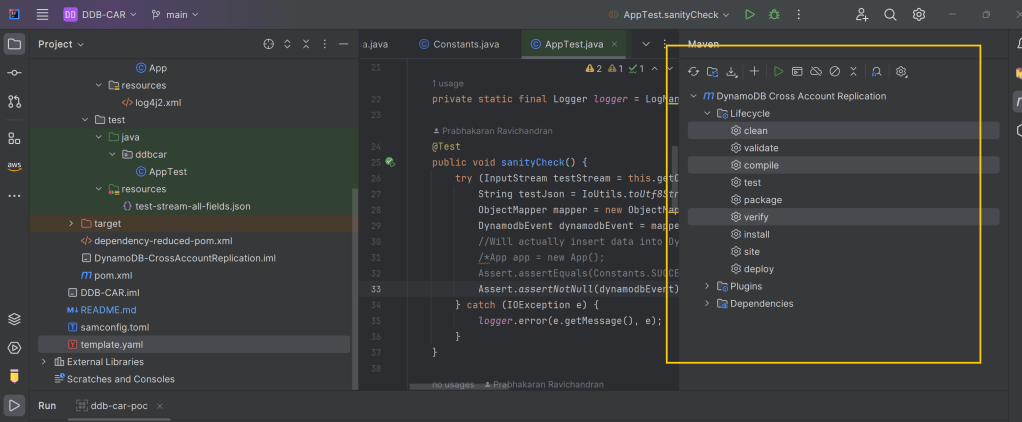
Run the command mvn clean compile verify using the Intellij Maven plugin:
SAMtastic Deployment:
- Right-click on
template.yamland chooseSync Serverless Application (formerly Deploy) - Input the Stack name and S3 bucket name in the pop-up window

Data Flow:
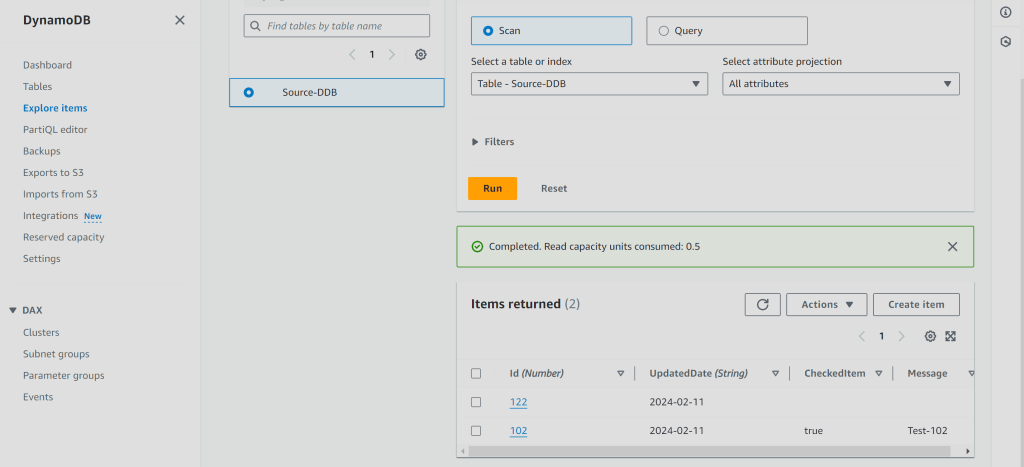
- Go to your Source Account DynamoDB Table and insert some data.
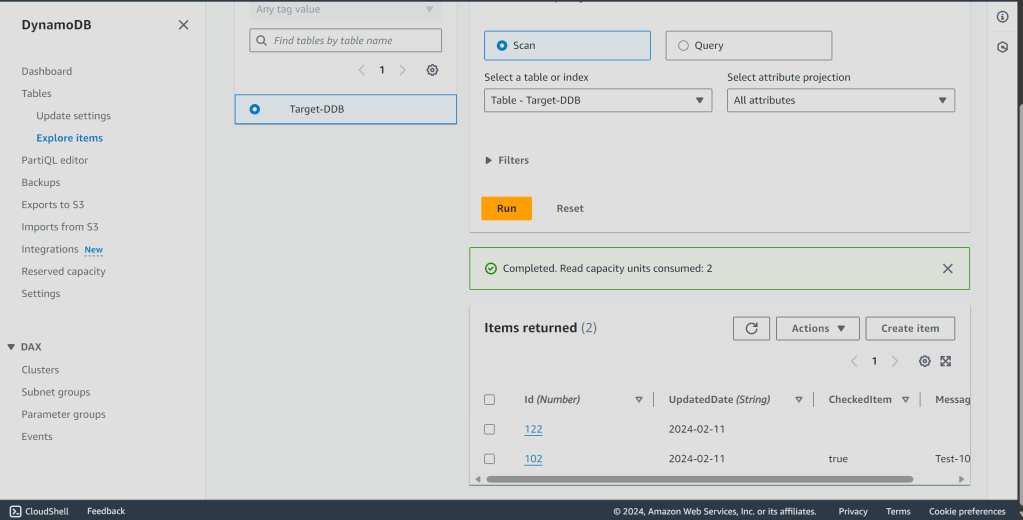
- Go to your Target Account DynamoDB Table and observe the replicated data!
The Secret Sauce:
Trust & Permissions: This setup hinges on carefully configuring trust policies and IAM roles across accounts. That’s why they’re configured separately to avoid mistakes.
Remember, with great power comes great responsibility: Don’t forget to clean up your resources (stack, log-group, alarms, and S3 bucket) to avoid unnecessary costs.
Now go forth and replicate! Share your experiences and conquer the data silo monster with your newfound superpowers.
 Why Surf Swim
Leave a comment