
Certain apps and keyboards have built-in spellcheckers, but for grammar you’re largely on your own. At least, you were until GrammarPal came along.
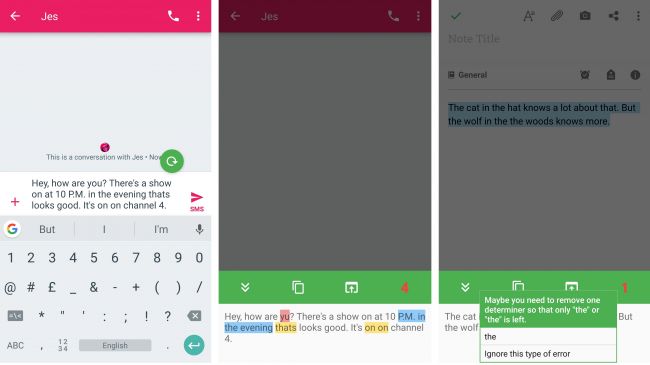
The app makes a little floating bubble appear any time you start entering text. Tap on it and it will tell you how many (if any) errors there are. Tap again to highlight the errors and see suggested fixes.
Errors are color coded so you can see at a glance whether it’s a style issue, a spelling mistake or something else, and you can create an ignore list or a custom dictionary if you don’t want certain things to be flagged.
You can also change the position of the bubble, change the language, alter the way errors are marked (either highlighting or underlining them) and change the theme, so it’s possible to customize the app to your liking. However it’s also very unobtrusive, so most of the time all you’ll see is that floating bubble and it’s small enough to ignore.
For $1.99/£1.89 you can get the GrammarPal Pro upgrade, which lets you backup and restore your dictionary, undo changes and further personalize the app, but the free version has all the core features.
 Why Surf Swim
Leave a comment