Hello Everyone…
This week we are going to see, how to customize your RIGHT CLICK option in Windows 7/8/8.1/10 computer…
This can be achieved by 2 methods:
-
EC_MENU (Recommended)
-
REGEDIT (if you are a computer geek, do this)
EC_MENU :
Step 2 : Click “List Editor” & then click “Add New” & select the EXE file directory of the file as shown
This slideshow requires JavaScript.
Step 3 : Check the added item & apply the changes as shown
This slideshow requires JavaScript.
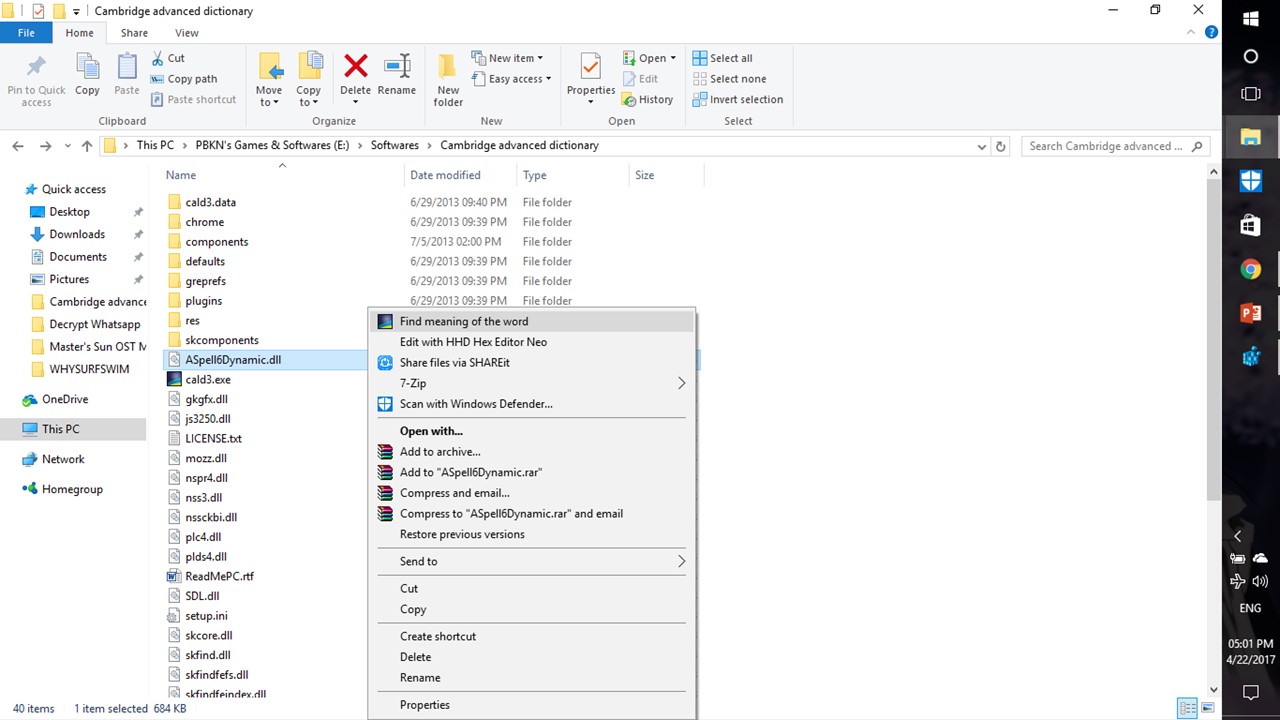
Step 4 : Ta – da !!! The Custom right-click menu is done
This slideshow requires JavaScript.
REGEDIT :
Step 1 : Open REGEDIT using run command
This slideshow requires JavaScript.
Step 2 : Goto HKEY_CLASSES_ROOT/*/shell and create a KEY as shown
This slideshow requires JavaScript.
Step 3 : Create another KEY inside and name it as “command” it as shown
This slideshow requires JavaScript.
Step 4 : In the MAIN_KEY create a STRING value as icon and set it’s value as shown
This slideshow requires JavaScript.
Step 5 : In the SUB_KEY edit the “default” value as shown
This slideshow requires JavaScript.
Step 6 : Ta – da !!! the right-click option is added
NOTE:
IT’S COOL TO HAVE YOUR OWN RIGHT-CLICK IN YOUR COMPUTER

 Why Surf Swim
Leave a comment