
Hello everyone,
This week we are gonna see the updated feature of SHAREIT app in your computer and phone…
So, don’t just rely on your wireless mouse for your next presentation… ‘coz, the SHAREIT app in your phone can do that for you…
But before that, download and install the latest version of SHAREIT in your PC & Phone:
Click here to go to download page
Step 1: Open shareit app on your PC and click on the marked area as shown below
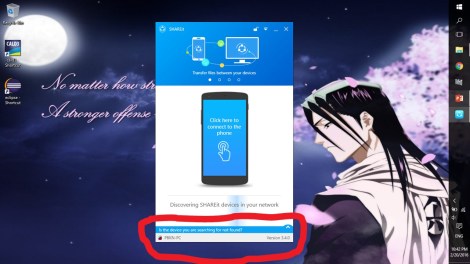
Step 2: Choose ” Create your personal network” and type a password to create it (Make sure your wifi is enabled in PC)

Step 3: Connect to the CREATED NETWORK in your phone by typing the same password
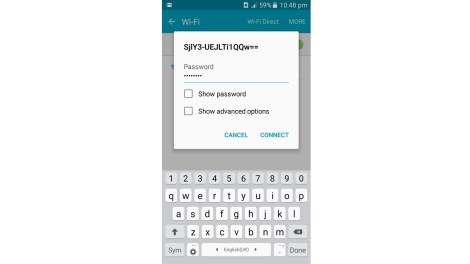
Step 4: Click on the marked area as shown below… in your PC
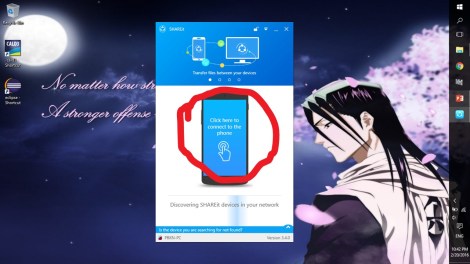
Step 5: Now you’ll get a QR Code, just standby

Step 6: Open SHAREIT app in your phone and click “Connect to PC“

Step 7: Now click, “Scan to connect“

Step 8: Scan the QR Code in your PC

Step 9: Ta-da… you are now connected, you’ll get a screen like this on your PC

Step 10: You’ll get a screen like this on your phone
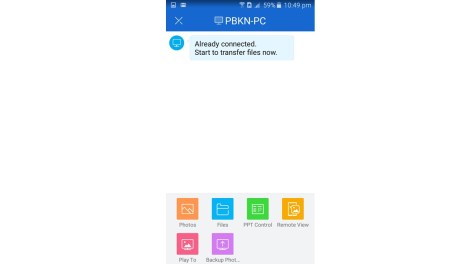
Step 11: Now click, “PPT Control” in your phone
Step 12: Open any powerpoint and slideshow it, in your PC
Step 13: You’ll get a screen like this on your phone to change the slides

NOTE:
A FREAKING NEW WAY TO CHANGE SLIDES IN YOUR NEXT OFFICE PRESENTATION
SO, JUST TRY IT !!!


 Why Surf Swim
Leave a comment