Skip to content
  • HOME
  • APPS
  • GAMES
  • BOOKS
  • ABOUT
  • CONTACT
  • POLICY
    • Privacy
    • Terms Of Service
    • Return/Refund Policy
Follow Why Surf Swim on WordPress.com

ALL RIGHTS RESERVED

Creative Commons License
Why Surf Swim by PBKN is licensed under a Creative Commons Attribution-NonCommercial 4.0 International License.

Favorites For the Day

  • Unknown's avatar
  • Unknown's avatar
  • Tripnetic's avatar
  • Ian's avatar
  • Unknown's avatar
  • matildechir's avatar
  • Alex's avatar
  • Unknown's avatar
  • Unknown's avatar
  • Monty's avatar

WSS Reach

  • 460,054 Viewers around GLOBE
Do Not Sell or Share My Personal Information
  • AWS
  • Working Suggestions
  • Android Development
  • Ideas
Why Surf Swim

Why Surf Swim

why surf the web ? swim it !!!

  • HOME
  • APPS
  • GAMES
  • BOOKS
  • ABOUT
  • CONTACT
  • POLICY
    • Privacy
    • Terms Of Service
    • Return/Refund Policy
  • Working Suggestions

Know the directX for your PC

PBKN's avatar PBKN August 16, 2014 0 Comments

To know the directX version in your PC,

Step 1: click WIN key and type “dxdiag“, then click the program as shown
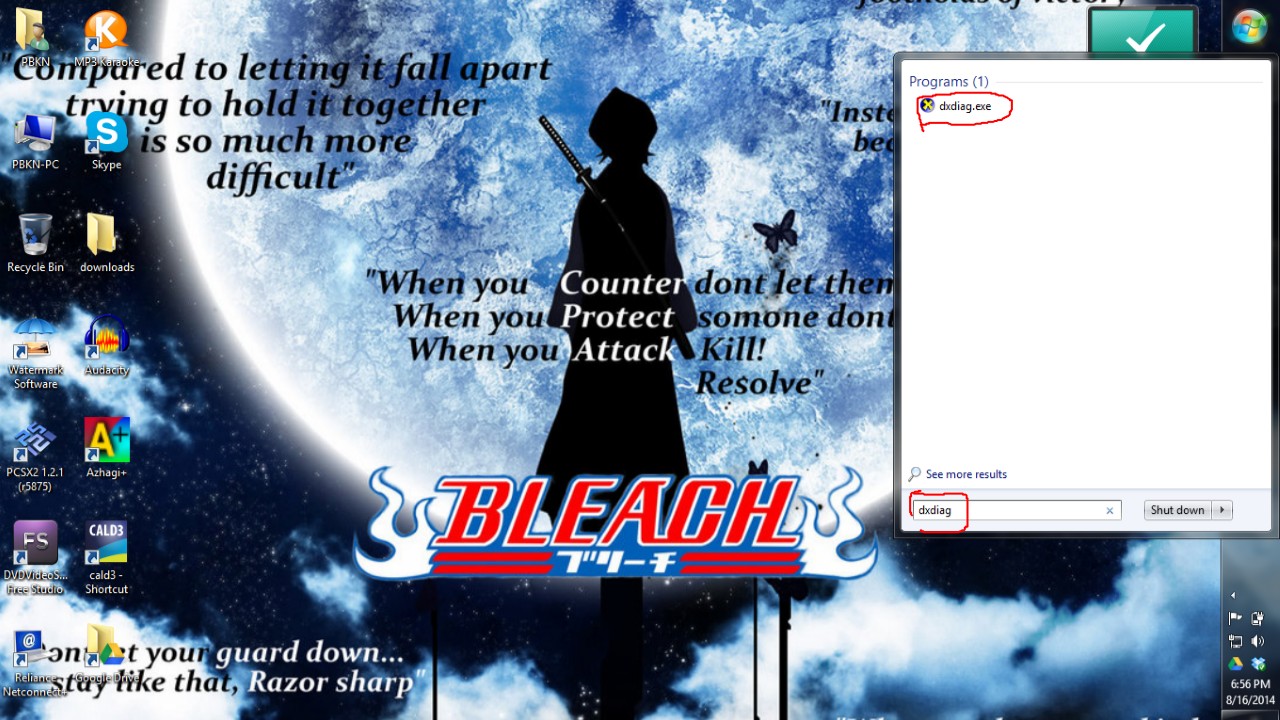
Slide1

Step 2:Now see the version you have in your PC

Slide2

NOTE:

Directx is must for gaming applications

Share:

  • Click to share on Facebook (Opens in new window) Facebook
  • Click to share on X (Opens in new window) X
  • Click to share on WhatsApp (Opens in new window) WhatsApp
  • Click to share on LinkedIn (Opens in new window) LinkedIn
  • More
  • Click to email a link to a friend (Opens in new window) Email
  • Click to share on Tumblr (Opens in new window) Tumblr
  • Click to share on Pinterest (Opens in new window) Pinterest
  • Click to share on Telegram (Opens in new window) Telegram
  • Click to share on Pocket (Opens in new window) Pocket
  • Click to share on Reddit (Opens in new window) Reddit
  • Click to print (Opens in new window) Print
Like Loading...

Related

CategoriesWorking Suggestions
Tags100% working, 64bit, directX, directX version, directX11, directx12, download, dxdiag, FREEWARE, IDM, PC, software, version, win 8, win 8.1, windows7
Previous
How to use WHATSAPP on PC
August 10, 2014
Next
Maintain BLOG like never before you did…..
August 23, 2014

Leave a comment Cancel reply

This site uses Akismet to reduce spam. Learn how your comment data is processed.

Website Powered by WordPress.com.

Discover more from Why Surf Swim

Subscribe now to keep reading and get access to the full archive.

Continue reading

Privacy & Cookies: This site uses cookies. By continuing to use this website, you agree to their use.
To find out more, including how to control cookies, see here: Cookie Policy
  • Comment
  • Reblog
  • Subscribe Subscribed
    • Why Surf Swim
    • Join 312 other subscribers
    • Already have a WordPress.com account? Log in now.
    • Why Surf Swim
    • Subscribe Subscribed
    • Sign up
    • Log in
    • Copy shortlink
    • Report this content
    • View post in Reader
    • Manage subscriptions
    • Collapse this bar
 

Loading Comments...
 

    %d